Category Archives: Multimedia

rebooting my mini-itx

It’s been a long time since I’ve worked on much anything computer-related as a hobby.  Things have changed quite a lot in the past year.  I moved to a much smaller apartment in Salt Lake, which is about a third the size of my old place.  The idea was to trim the fat and focus on going back to school, which is my major direction in life these days.  When I moved in, I didn’t have room for setting up a desktop computer anywhere, so it’s been just my netbook and me.  That suits me plenty fine, though, I wasn’t really using it that much either.  I had just upgraded to a six-core so I could rip DVDs much faster, and now it was sitting headless wherever I could find room, and even then, only used occasionally.

It’s not just at home that things have been changing.  At work I got to make the transition from programmer to full-time sysadmin, and I’m absolutely loving it.  I knew I was getting tired of coding, and I had always enjoyed just taking care of servers, and now I get to do that all day long. When I initially started as a sysadmin, I didn’t think our small company would have enough work for me to do after a few months.  In actuality, I’m kept busy all the time.  The part I like the most is that part of my job is doing research, how to do things better, more efficiently, anything to make the workload easier.  It’s fun.

On top of all that, my school attendance is starting to ramp up more, and I’ve been consistently drifting to adding more classes to my workload.  All this stuff has basically booted Linux out of my life as a hobby, and so now I need things to “just work” without hassle, so I leave my installations alone.

One thing I’d been neglecting a little bit was my entire HTPC setup.  I hadn’t been using it much lately just because I would mostly stream some Netflix (yay, Doctor Who!).  My setup has been a beast though, normally running for months on end without the slightest hiccup.  What started to happen though is that I would come back to using it, switching my HDMI input over, and the box would be powered off for some reason.  Most of the time, I would either power it back on and go on with life or just ignore it.  Until one day it wouldn’t power on at all, and I just shrugged it off and determined to look at it later.

Well, later turned out to be finals week, when my brain has been working overtime, and I seriously needed a hobby.  I pulled out my main frontend and started looking at it to see what was going on.  It was plugged in properly and everything looked legit, but when I hit the power, the CPU fan would start up for a second and then everything would stop.  After fiddling with it for a bit, I started to notice that something was smelling burnt.  Once that happened, I abandoned my diagnosis.  Even if I did manage to get it working, I didn’t want it to catch everything on fire.

At the same time, my external USB drive enclosure died on me.  So even if I could have gotten it working, I still wouldn’t have had a way to watch my shows.  Them giving out on me hasn’t bothered me in the least — the entire setup has been running flawlessly for years, and I’d managed to get a lot of mileage out of them.

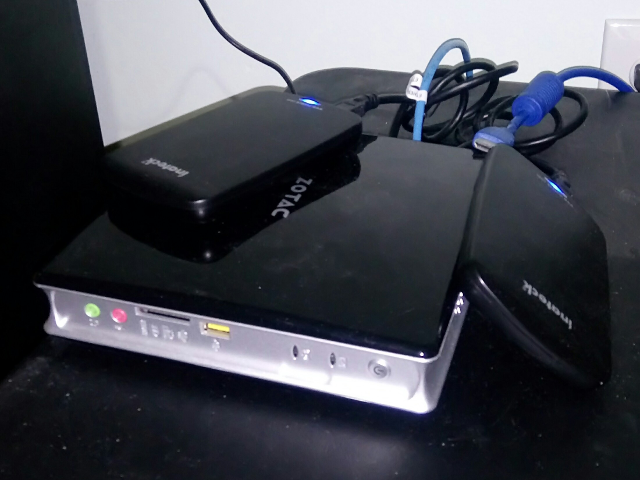
Now I had to decide what I was going to do.  I have a lot of hardware, but in pieces.  I have four mini-ITX boards altogether, two of them are VIA C7 chipsets, and the other two are Zotac boards both running low-powered Celeron CPUs (around 35W if I remember correctly).  The power supplies for the VIA boards use 20-pin connectors and only run at about 80W, and aren’t enough to handle the Zotac boards which use 24-pin connectors.  So I have this mix of hardware, and nothing powerful enough to act as a frontend.

There are some great packaged systems out there now where for between $200 to $300 you can get an entire package in one go that does exactly what I’m putting together myself. I considered the idea of just starting over, but I decided that it’d be cheaper to just salvage what I could.

So this week I ordered a new USB HDD enclosure, and I also ordered a new power supply for the main Zotac board.  I found a site that sells really small power supplies for mini-ITX boards, called picoPSU.  The design eliminates a lot of the hardware that I would normally need to get all the power to my box.  I was really skeptical about them when I first heard of it, but did some looking around and it looks like it’s exactly what I need.

In the meantime, I ripped out my motherboard out of my desktop, and put both Zotac boards in there to make sure they still work, and thankfully they do.  I got the old setup pieced together using my desktop case, and fired up the old system to play around with it.

I had started to forget how much time I put into this thing.  I forgot that I had put countless hours stitching this thing together, running a custom build of Gentoo suited to run on small environments.  On top of that I made hacks to mythvideo and got those working to polish off some rough edges.  It just started to come back to me how much I’d worked on this … and how much fun it was. :)

I played around with my frontend a little bit, and fired up a few movies just to try out the surround sound.  It was awesome.  I’d forgotten how nice it was to have that huge library on demand, too.

So I’m excited now to get things up and running.  It’s been a good little while.

Leave a Comment

Filed under Hardware, Multimedia

multimedia reference guide: x264

It seems a little weird to me to post something on my blog that I already posted on our blog at work, but whatever. I figured it’d get more visibility if I wrote about it, since I already cover multimedia stuff sometimes, plus I’m excited about this thing anyway. :)

At work, I get to do all kinds of stuff, and working with video is one of them. I threw together an x264 reference guide on my devspace for what the settings of each preset covers, compared to the defaults. I’ve even translated it to spanish! Vamos, che!

The thing I like about this, is that it helps me see which areas to start tweaking to get higher quality gains, and which ones to stay away from. It kind of sheds light on where the best places to start tweaking are. For instance, the settings that are changed on the ultrafast preset should never be messed with at all, if you want a good outcome. And on the flipside, the ones under the placebo preset are going to slow down the encode greatly if you start beefing them up.

Generally speaking, though, it’s a best approach to use presets set by developers. Every now and then I get the idea in my head that I can somehow make things better just by tweaking a few of the variables. That never works out too well. I always end up spending like 60 minutes to encode a 5 minute video, and then I can’t tell a difference after that. Whoopsie fail.

Next, I want to put together a similar type guide for Handbrake presets, both to compare their presets to each other, and then how to duplicate the same x264 settings using both the x264 cli encoder, and libav. The reason being that, a lot of times I really like the output that Handbrake delivers, and I want to duplicate that using other encoders, but I’m not sure how. That’s what I’m planning to target.

Leave a Comment

Filed under Gentoo, Multimedia

uphpu presentation: ripping dvds

I gave a short presentation last night at uphpu on ripping and encoding DVDs under Linux. I wanted to type up a few notes on some stuff I mentioned during the meeting.

Short version: Use Handbrake (available on Linux, Mac OS X and Windows). I’ve gone through a lot of applications through the years trying to find that “perfect rip”, and Handbrake beats everything hands down. I’m a videophile who likes everything looking as nice as it can, and this is what I use regularly.

Accessing DVDs

The first things you’ll need installed on your box is libdvdread and libdvdcss. libdvdread will access the DVD filesystem, and libdvdcss will decrypt the DRM on the disc. These should both ship with your distro, or if they don’t, should be relatively easy to acquire.

I use a lot of command line tools to access DVDs, so my focus was on that. The reason for that is because I have a lot of shell scripts to rip my massive library of discs, and I store data about them in a database.

lsdvd is the first stop. A very small app that uses libdvdread to display human and script-friendly output of the details of your disc.

mplayer dvd:// and mplayer dvdnav:// plus the optional track (dvd://3) or optional -dvd-device argument to specify the location of the device or ripped ISO.

I use dd to copy the contents of the entire disc to the harddrive and then rip it from there, to avoid wear and tear on the DVD drive, and also because I can do things like simultaneously rip one disc in the background and encode another at the same time.

When accessing the drive, you’ll want to use mplayer or some other program to access the drive and decrypt the CSS so that the drive itself caches the access. Otherwise, it may lock up.

I use pv to dump the disc and give me a pretty progress bar with ripping ETA and disc read speed: pv -ptre -w 80 /dev/dvd | dd of=movie.iso

If you want to extract the chapters, you can use dvdxchap, which is part of the ogmtools package.

DVD Tracks

Every movie I’ve run into has one track specifically for the video. Using lsdvd you can find the longest track, time-length wise, and that will be the movie.

TV shows on DVD often put many episodes into one track, where one or more chapters may contain an episode. You’ll need to examine these yourself to find out where each one starts and each one ends.

Another caveat is that they are not always ordered on the track or on the DVD in the same order that shows up in the menu. The best advice when accessing tracks and titles on DVDs is to never assume anything, if you are trying to preserve order.

DVD Subtitles

Subtitles on DVDs come in two formats: VobSub and Closed Captioning. VobSub subtitles are images that are overlaid onto the picture. Closed captioning is a text format.

If you have a ripped VOB (DVD MPEG-2 video), you can extract the subtitles using a program called ccextractor. It will save the subtitles to SRT, a subtitle format that can be muxed into your final video.

Encoding DVDs

Handbrake is a very “smart” application that will make things extremely easy on you. It supports encoding using three codecs: x264, ffmpeg and theora. x264 is an actively-developed H.264 video codec, and is used professionally by many companies. It also has a lot of options that you may find useful in your encode, based on your target playback device (ipod, ipad, iphone, apple tv, htpc, computer, etc.).

Handbrake supports muxing (or putting audio and video into a wrapper format) to two containers: MP4 and Matroska. MP4 is a very popular standard used in lots of places. It’s an open-specification. Audio is usually AAC. Matroska is an open-source openly developed container format that has a standardized specification. Support for it is growing in a lot of devices. Matroska can handle multiple video streams, multiple audio streams, multiple subtitles, stores metadata, chapters and attachments. Strictly speaking, either one will work fine for most people’s needs, but for those looking for advanced usage and tagging, Matroska will fit your needs. On linux, the tools for muxing and accessing information about a Matroska file are found in the mkvtoolnix package.

Deinterlacing and Decombing

Most movies will be progressive video, meaning that each frame is one full picture. Production studios and DVD authors may have their video interlaced. Interlaced video is where half of the frame is shown in quick succession where the second half is shown. On older TVs (like the CRT tube TVs) display at a native resolution of 480i, so you won’t notice the lines. Progessive displays (computer monitors, HDTVs, etc.) will display the lines and it can be a visual annoyance.

Handbrake uses filters to convert interlaced video to progressive video, called deinterlacing. Decombing is also a feature that Handbrake supports, which is basically “smart” deinterlacing. It is safe to turn on the decombing filter to the default setting for all your encodes, and let Handbrake automatically convert your video for you. Don’t use the deinterlacing filter unless you specifically know what you are doing.

Please see 100fps.com for a quick explanation of video deinterlacing.

Other Handbrake Features

Handbrake has lots of handy features. It has support for “profiles” which is a combined set of preferences for container format, video codec, audio codecs, preferred subtitle settings, post-processing, deinterlacing, decombing, and all the H.264 settings that come with x264.

One nice thing it will do as well is auto-crop your feature film for you. This is a boon if you have a letterbox source video, where the movie itself is in widescreen, but the presentation is in fullframe.

You can also “queue” up your encodes, so Handbrake can be working on multiple files. You don’t need to wait for one to finish before assigning it it’s next task.

Handbrake is also multi-threaded when using x264 to encode your video. With a six-core desktop, I have been able to encode video using the “Normal” profile between 160 to 180 frames per second. Meaning a 25 minute video will take about 2 1/2 minutes to encode.

PHP Classes

I’ve got some small classes that I use in my shell scripts for Matroska and Handbrake (v0.95 required). You may or may not find these helpful. I should warn that these are just used on my own set of scripts, so they may or may not be very clean or can have small bugs.

References

If you want more information, here are some good places to go:

doom9
Multimedia wiki
Handbrake forums
100fps.com

Also, feel free to contact me if you have any questions, and I’ll be glad to help.

Leave a Comment

Filed under Multimedia, Programming, Matroska, MPlayer

wrapper script for disc_id

I wrote a little wrapper script for disc_id tonight, available here. disc_id is a little binary that ships with libdvdread, or at least, it used to in older versions.

I use disc_id to give me a unique 32-character string of a DVD, so I have an identifier to track them by in my database of DVDs.

I don’t know if it’s just me or not, but my DVD drives have issues trying to poll the devices. Once I insert a disc, it will take a few seconds for it to register completely so I can access it. However, binaries that access it will think it’s ready to respond sooner than it is able, and will die unexpectedly. So what I needed was a way to get the disc id and not worry about whether or not the drive has finished registering or not.

I just call my little script dvd_id and it is simply a small wrapper that checks the exit code of the disc_id binary. If it doesn’t work the first time, it sleeps for one second and tries again, then repeats the process until it gets a successful exit code of zero.

That’s it. Pretty simple, but like all little scripts, you really tend to depend on them.
#!/bin/bash
EXIT_CODE=1
DEVICE=$1
if [[ -z $DEVICE ]]; then
DEVICE=/dev/dvd
fi

if [[ ! -b $DEVICE ]]; then
echo "Device $DEVICE doesn't exist" >&2
exit 1
fi

while [[ $EXIT_CODE != 0 ]]; do
/usr/local/bin/disc_id $DEVICE 2> /dev/null
EXIT_CODE=$?

if [[ $EXIT_CODE != 0 ]]; then
sleep 1
fi
done

Leave a Comment

Filed under bend / dvd2mkv, Gentoo, Multimedia, Programming

web media frontend

I have always wanted to tweak my HTPC frontend quite a lot to add extra functionality, but the entry barrier to learning a GUI language has been way too high for me.  I’ve had success though, in patching MythFrontend to do some things a little better for me, but I’ve always wanted to get my own going if I could.

Recently, I was thinking about how LIRC can capture IR events and map them to X keyboard events.  Basically, you can control X applications with your remote control.  I started to reason that if that were possible, then I could just use my web development skills and create a webpage frontend for my HTPC that would run on a lightweight browser, and listen for keystrokes.

Just playing around with it tonight, I actually made some really great progress thanks to a combination of a good friend, my humble jQuery beginnings, and my laughable CSS skills.  This is the result so far. :)

I’m really stoked about the implementation so far.  You’ll most likely need Firefox to get that working properly.  It will capture the arrow key presses (up, down, left, right) and use that for navigation.  I realize that the beginnings are rather crude, but the fact that I could throw this together, so quickly, while I’m just barely learning my way around jQuery seems pretty impressive to me.  I’m actually quite proud, though, that I got the navigation to work properly, too, so wrapping around rows and columns works. :)

This is certainly going to be a fun project to hack on.  If I could get this working, this would open up all kinds of possibilities for me for displaying metadata and new options for navigation.

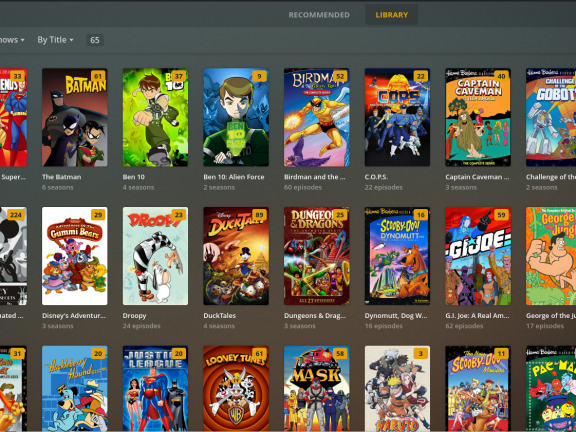
For comparison, here’s a screenshot of what my frontend looks like right now.  As you can see, I’m trying to imitate the style as closely as possible.

There’s a lot of advantages to having it web-based — not that I’m going to serve up anything remotely or anything, this is solely for my LAN.  It’ll just allow me to build out stuff much faster.

The hard part is going to be doing testing on the frontends.  They are both running off of tiny installations, and it’s not easy building and porting software to run on them.  Sounds like a challenge that’s extremely hard, going to take a lot of time, and will have marginal benefit and at the same time increase my workload and opportunity to own more of my software stack when things go wrong.  That’s just right up my alley. :)

1 Comment

Filed under Entertainment, Gentoo, Multimedia, MythTV, Programming

handbrake ebuild

My life has been uncharacteristically busy lately, which is a really new experience for me, because I usually have so much free time that I don’t know what to do with myself.  Anyway.  As a result of lack of time, it’s been interesting to see how I deal with the crunches when there’s stuff I want to work on.  So far though, my adaptation has been nothing more than watching tasks I want to do be ignored for weeks on end.

So, in an attempt to get one task of many moved forward, I’m just going to do a brain dump of my thoughts into a blog post and hope that someone can take it running from here.

To start with, I totally love the video encoding tool Handbrake.  It is an aboslute godsend, one that makes it possible for me to actually encode all my DVDs to MPEG4 using x264, and have me happy on every count.  (If I’ve talked about this already before … oh well.  I can’t remember these things anymore.)

There’s a lot of reasons for it’s awesomeness, but I’ll write those up in a later post.  The simplest summary is probably to say that it passed the Star Trek test with flying colors — which was always assumed to be an impossible task.  So, saying I’m happy is putting it mildly.  It’d be more accurate to say I feel like a schoolgirl on crack who is dancing on the rain.  Or something.

Anyway.  I’d like to roll an ebuild for it and get it into portage, if possible, but because of the build system, there’d be some things that need to change first.

The build system used in Handbrake downloads sources from their website and unpacks them during the building stage.  While that’s fine if you’re building it yourself, and if you wanted to roll your own ebuild (which, in fact, there are some already in our multimedia overlay), it wouldn’t be good from a QA stand for Gentoo.

So, what needs to be done (this is where I start whining about how busy I am, and how this is your job to fill in the gap) is the Makefile needs to be modified so it won’t download and unpack the remote sources.  It can still access them, but it needs to be up to the ebuild to do those in its own stages — like moving the tarballs into SRC_URI and using src_unpack to unpack them.

I haven’t looked closely at the build system, but I imagine it wouldn’t be too difficult to patch.  If someone wanted to take it from there, I could run the last few legs and see about cleaning up the ebuild and possibly getting it included in the tree.

If anyone’s up for the challenge, follow this bug.  Thanks :D

9 Comments

Filed under Gentoo, Multimedia

mplayer + libbluray support

MPlayer just very recently got support for playback of unencrypted Blu-Ray discs using libbluray.  (Thanks to all the devs and testers! :) )  Apparently development for the library is being hosted on VLC’s git servers now, something I had no idea about.  I thought the project was dead upstream.

I’m adding an ebuild for libbluray to the gentoo multimedia overlay if someone wants to access it.  It’s something I plan on pushing into the mainline tree soon enough, once it’s properly finished.

If you are building MPlayer from SVN, it will automatically detect the new library, and build against it.  You can use the -9999 ebuild in the portage tree.

To playback some of your Blu-Ray content, you will first need to extract it to your harddrive.  I use MakeMKV, also in the multimedia overlay, to accomplish that.

Here’s a simple way using the CLI to dump the contents:

$ makemkvcon backup –decrypt disc:/mnt/bluray/ <location to dump content>

The syntax for playback is:

$ mplayer br:// -bluray-device <path to dumped content>

By default, it will play the longest playlist (I think).  If you can get the list of playlists available, you can pass that as an optional parameter to br:// (fex: list_titles /home/steve/bluray/src; mplayer br://5 -bluray-device /home/steve/bluray/src).

libbluray also ships with a few example programs that do basic stuff like listing the titles (list_titles), dumping information about the playlists (mpls_dump), and a few more (sound_dump, index_dump, mobj_dump, libbluray_test, bdsplice, clpi_dump).

Have fun with it. :)

5 Comments

Filed under Gentoo, MPlayer, Multimedia

gentoo + youtube – flash + mplayer

So, if you’re getting a little tired of Flash and it’s silly security hiccups, but still can’t live without the YouTubey goodness that is the awesome sauce of life, here’s a simple solution I stumbled onto: use mplayer to watch the videos!

I haven’t found a way to embed this in my browser yet, but I haven’t really looked either, so this is for all the CLI geeks.

$ mplayer $(youtube-dl -b -g http://www.youtube.com/watch?v=9IfEInQ7aic)

And thar ya go. :)

Oh, and did you know that Flash Gordon is on Blu-Ray now?  Flash!  Aaaaaa-ah!

5 Comments

Filed under Gentoo, MPlayer, Multimedia

blu-ray on gentoo

I’m pretty excited because I got my first BD-ROM drive last night from NewEgg, a LITE-ON iHOS104-06.  That means I can do some real testing, ripping and playing around.

Decrypting Blu-Ray discs is a really confusing process … I’m still not even sure of all the steps that are involved.  Everything I understand has been cobbled together from posts on the doom9 forums.  While the forums are a great resource, it’s not a comprehensive one at times.

I was playing around with aacskeys (from doom9 forums, available in portage), and it managed to decrypt / find the keys / whatever it’s doing / work successfully on most of my movies.  I’m not sure how to get them off after that, though, or why that’s important yet, but I do know it’s a good sign. :)

For now I’m taking the simple route of using shareware to access my movies.  There’s two programs I’ve used so far to rip my Blu-Rays, AnyDVDHD and MakeMKV.  They are both nice programs with some good features, but MakeMKV is the only one that has a Linux port.

The last time I tried MakeMKV, it couldn’t decrypt all my discs, so I had to use my PS3 to rip the ISOs, and then use AnyDVDHD.  This time, though, using the most recent version (1.5.6), it managed to decrypt all of my discs.  I was going through my Blu-Rays to see if it could handle all of them, but I gave up after the 15th one, since it was working on every single one. :)

While AnyDVDHD will extract the original, unencrypted files to your harddrive, MakeMKV will additionally mux them at the same time into Matroska.  I kinda wish I could still have the originals, but I’m not going to be picky. (Edit: you can, see comments)

So, no real plans after this except to play around and post my results.  I really don’t have that much interest in playing with Blu-Rays on Linux other than curiosity.  I don’t wanna rip them and stream them to my HTPC just yet since I don’t have the storage space, and because my frontend isn’t quite as HD-ready as I’d like it to be (I still need to update some software and tweak settings … lots of testing, meh).

I am going to be looking at some other tools and see if I can get them in portage or our multimedia overlay, which reminds me, I just added MakeMKV to there this morning if someone else wants to try it out.

6 Comments

Filed under Gentoo, Matroska, Multimedia

google vp8 fud

I don’t usually like chiming in on matters like this, but I’m going to say this time that I’m disappointed in Ars Technica’s recent FUD-provoking article on Google’s VP8 codec being open sourced.

Specifically, and I’m not picking on Ars in general, I notice in popular journalism a technique to claim that many people are supporting a view, but then to provide only *one* source that supports that view.  That doesn’t mean that many people support it … it means that at least one person does.

For example:

Some critics of VP8 contend that its design is sufficiently similar to H.264 to warrant concern. One such critic is Jason Garrett-Glaser, a software developer who works on x264, a well-known open source implementation of H.264. In a lengthy analysis of VP8, he attacks On2′s claim that the format is superior to H.264 and says that the format’s legal status is too dubious for companies to trust.”

There are no other references to “some critics” anywhere else in the article.

Again, here’s a second example:

MPEG LA’s threats at this stage appear to be little more than self-serving saber rattling, but others who have analyzed the technology seem to believe that there could be serious patent risks on the horizon.”

There is a reference earlier to MPEG LA’s own remarks, the original piece of which makes its own conclusions as well.

Looking at that piece, the whole article is based around *one* question that he shared:

He writes:

Here’s an excerpt from my email exchange with him:

JP: Let me ask you this: Are you creating a patent pool license for VP8 and WebM? Have you been approached about creating one?

Larry Horn: Yes, in view of the marketplace uncertainties regarding patent licensing needs for such technologies, there have been expressions of interest from the market urging us to facilitate formation of licenses that would address the market’s need for a convenient one-stop marketplace alternative to negotiating separate licenses with individual patent holders in accessing essential patent rights for VP8 as well as other codecs, and we are looking into the prospects of doing so.”

That’s the other thing I don’t like about journalism … I would call it a pet peeve, but really it’s just a matter of not being able to trust the reporting when all we get is excerpts.  His entire article is written around one excerpt of an email exhange.  Why don’t journalists ever post the entire exchange?  Lack of transparency, to me, just gives the impression that they are trying to present a biased view.

I realize, of course, that in only including excerpts here that I’m doing the same thing in a sense, but at least I’m providing references to the full sources I have available so that anyone else can do their own analysis and come to their own conclusion.

If you wanted to see his own conclusions, just read the article.  First of all, the headline is: “Google’s “Royalty-Free” WebM Video May Not Be Royalty-Free for Long”.  There’s no way to draw that conclusion from the article.

I wonder if the editors come up with the titles of the articles themselves.  It  could easily have said “MPEG LA may create a patent pool for VP8″, and that would be more accurate.  Compare that possible title to the other one when reading the author’s assumption after the excerpt:

“It would seem, then, that VP8 may end up subject to the same licensing issues as H.264. If MPEG LA does create a patent pool license for the standard, the free lunch Google promised yesterday may not be free after all.”

That’s an obvious conclusion, and I could come to the same one as well — If this, then that.

We can see again, even in this article, that he uses the same tactic of using one source and pretending it’s many:

“As a number of observers have already noted VP8 isn’t free from patent liability.”

Again, it’s not a number of observers … it’s one blog post … the same one that Ars referenced as well!  Jason is a great multimedia dev, but he’s not a patent lawyer last I checked.  I’d be equally bothered if someone took my opinion, on any piece of my blog, and quoted me as the expert who knows which way the industry in Linux is going to go, or what legal battles it has to deal with in the future.

My take on the whole thing is this — first of all, I thought Jason’s original piece was very well written, and it was exactly what he set it out to be: a technical write-up of the codec.  He made some comments in passing about patents, but the focus of his post was how VP8 is better than Theora, not as good as x264 (and I would agree).  I would imagine that the poor guy didn’t expect his blog post to get as much attention as it did, and that it will probably affect future blog posts, if any.

My opinion on the MPEG LA stance, reading just the excerpt above — and not the author’s own conclusion — is that their business stance is completely normal and reasonable.  The way I read it is not that MPEG LA is claiming anything, but that some other companies might be wanting their own assurances of patent protection, and looking to their company to make sure they have their licensing ducks in a row.  That could be it, maybe not.  Either way, we don’t have any information from them to really speculate.

Personally, I’m not too worried about the whole thing.  I think VP8 will emerge just fine, there may be *some* licensing involved somewhere, but in the end, open source tools will go on just like it has for years and support the standards, and consumers will still win out with more options.

As far as journalism goes, I think we’re going to see more FUD pieces about the whole thing.  It’s a common tactic used by big bullies (anyone remember SCO?).  I’m not saying the concerns are illegitimate, but I sure wish people would use critical thinking and analysis when writing their articles, instead of trying to spin up hype and paranoia for .. whatever reasons they may have.

It’s obvious that my attitude is that modern journalism has completely lost its credibility, and that’s the reason I don’t like writing about it — is because I get into rant mode. And I apologize for that.  Also, sorry that the post kinda bounces back and forth between my points … it’s the nature of a rant, I suppose. :)

One last comment (this is one of those posts that has the misfortune of never ending), that I wanna make sure I clarify is that it’s not my intention to disprove, stir controversy or anything like that … my only goal is to encourage critical thinking which seems to be a missing element in reporting these days.  I’m personally tired of how research becomes whittled down to conclusions.  It’s like statistics — you can often make the numbers say anything you want.  But, yah, not trying to hand out pitchforks or anything, I just think it’s a good idea to be honest in reporting, present the facts, and let people come to their own conclusions.  That’s all. :)   Have a donut.

9 Comments

Filed under Gentoo, Multimedia